Try it. Demo it.
A long list of features does not tell the whole story. A really great application has a natural, intuitive flow to it. This is what we strive for. You can be the judge on how far we have come. In the "Try it" section below, we have arranged for you to have complete access to two conference's applications and data. Seeing is believing.
We understand you might not have an iPod Touch, iPhone or iPad to try it yourself or you may have a group that wants to experience it together, so we also offer a live online demo of our app through Webex. See our "Demo It" section for details on how to arrange it.
We understand you might not have an iPod Touch, iPhone or iPad to try it yourself or you may have a group that wants to experience it together, so we also offer a live online demo of our app through Webex. See our "Demo It" section for details on how to arrange it.
If you have access to an iPhone, iPod Touch or iPad, you can download fully functional applications from two of our clients:
1) PrimeTime 2013, by the Canadian Media Production Association
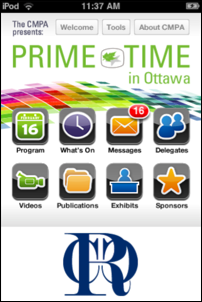
In 2010 and 2011 we delivered an iOS App. In 2012 we delivered an iOS App and a Mobile Web Browser Solution. In 2013 the Mobile Web Browser Solution was so strong that CMPA elected to use it for all platforms. To try it out, on your mobile device go to :
www.cmpa2013.ca
You will need a demo account. Please contact us using the link at the bottom of this page for temporary credentials.
2) The American Association of Neurological Surgeons (AANS)
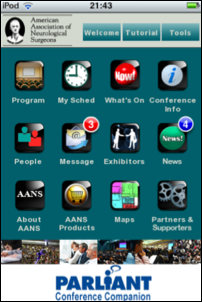
In 2011 and 2012 they did it again, with all the second and third generation improvements you might expect. In 2012 and 12013 they offer both the iOS and Mobile Web Browser versions to their attendees.
To download the iOS Version of the current AANS App click here.
No account is required to run all but the messaging section of the app. There is a lot of data that goes with this app, Powerpoints for sessions and e-posters, videos of surgeries, video advertisements from the exhibitors, all forms of media, session support and conference logistics support.
"Entirely paperless" includes the exhibitors, speakers and show staff. Be sure to have 1.5 GB of room on your device before running the app the first time and make sure you are on WiFi or you could have a big 3G wireless bill next month.
You can read more about it here in an article produced by magazine Meetingsnet.
To use the Mobile Web Browser Version click here
You will need a demo account. Please contact us using the link at the bottom of this page for temporary credentials.
3) The IEEE International Conference on Communications 2012 (IEEEICC)
To try it out, on your mobile device go here
You will need a demo account. Please contact us using the link at the bottom of this page for temporary credentials.
There is more:
Conference Companion has a wealth of features that you can pick and choose from to match your meeting's workflow and offerings. The above two examples are representative but are by no means demos of all of Conference Companion's capabilities. GIve us a call. We would be happy to discuss your needs.
Once you have gone through the material above, you can arrange a live Webex demonstration where, through screen sharing, we will walk you through the actual iPod touch App.
If you prefer, you may CONTACT US using a secure web form that allows you to attach files about your conference if you like.
If you prefer, you may CONTACT US using a secure web form that allows you to attach files about your conference if you like.